![[personal profile]](https://www.dreamwidth.org/img/silk/identity/user.png) teres posting in
teres posting in ![[community profile]](https://www.dreamwidth.org/img/silk/identity/community.png) newcomers
newcomersHello! I am the writer of the tutorial on the RTE that soc_puppet posted, and at the request of ysabetwordsmith, here it is, for ease of access:
--
So, at the request of soc_puppet, this is a guide to the basic functionality of Dreamwidth's Rich Text Editor ("RTE" for short).
(Note: this is based on the beta RTE, which can be accessed by going to the Beta Features page and turning on the "New Create Entries Page" feature. I'm also not familiar with everything the RTE can offer, nor with all the bugs.)
What can the RTE do?
This is the interface of the RTE:
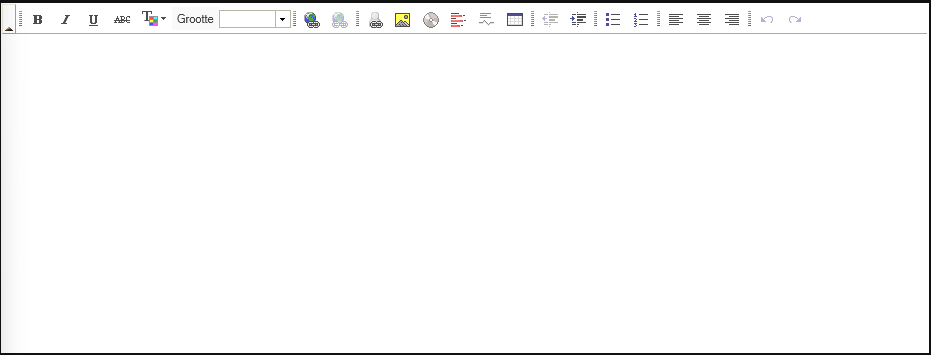
The functionalities are as follows (from left to right, and with descriptions of less-intuitive icons; each icon also has a tooltip with description):
- Bold text
- Italic text
- Underlined text
- Struck-through text
- Coloured text ("T" with coloured square)
- Differently sized text. *
- Making/changing a link (Globe with link)
- Deleting an existing link (Globe with broken link; greyed-out by default) *
- Linking to a user (User icon with link)
- Inserting an image (Photo icon)
- Inserting a video/audio clip (CD/DVD icon)
- Making a poll (Icon with data)
- Making a "cut" (Text with squiggly line)
- Inserting a table *
- Outdenting text (Text with arrow to the left)
- Indenting text (Text with arrow to the right) *
- Inserting a bullet point list
- Inserting a numbered list *
- Aligning text to the left
- Aligning text to the middle
- Aligning text to the right *
- Undoing changes
- Redoing changes
Specifics
While most of these functionalities work intuitively, there are some that do not, or that have extra options.
Colour picker
The first of these is the colour picker. It offers forty colours initially; when you go to "more colours", you will see something like this:
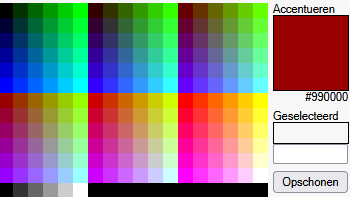
You can choose from 216 colours, as well as some shades of grey, here. If you want to choose your own colour, use the field above the "clean" button, and then click "OK".
Size
The RTE offers the basic text sizes "smaller" and "larger", as well as a range of sizes from "xx-small" to "xx-large".
Links
This has several extra functionalities, such as setting whether the link opens in a new tab. I'm not familiar with this, unfortunately, so I can't describe this in detail.
Linking to users
If no site is selected, the link goes to the user on Dreamwidth. The types of accounts available for linking in this way are described here.
Images
Alt text and dimensions can be set while inserting the image, and can always be adjusted by selecting the image and clicking the image icon.
Video/audio
These can be inserted by pasting the embed/share code given at the original website into the field.
Polls
These are only available to paid accounts, so I am not familiar with their operation.
Cuts
This is a feature similar to a "readmore" on other websites, except that it is fully customisable. You can select which portion you want each cut to cover and enter custom text (the default is "Read more...").
Some notes on cuts:
- If you want to edit the cut text, you need to go to any of the other entry options, search for "cut text=" and adjust it there.
- Unless you are well familiar with HTML, I suggest you enter the cut after you have formatted the text the way you want. Trying to change formatting beneath a cut invariably leads to bugs.
- If you want to enter this character (") in cut text, you ought to do so by entering '"', as the cut text will misform otherwise.
And that was that! If you have any questions or corrections, please let me know! (In case I don't know, and you can't find an answer in another way, feel free to open a support request.)


Thank you!
Date: Apr. 17th, 2025 05:31 am (UTC)Re: Thank you!
Date: Apr. 17th, 2025 05:46 am (UTC)No problem (and I'd accidentally put this in Casual HTML instead of Markdown, which is now fixed!)!
no subject
Date: Apr. 17th, 2025 12:28 pm (UTC)no subject
Date: Apr. 17th, 2025 03:07 pm (UTC)That's good to hear!
(As a general note, I would still recommend Casual HTML to people for some functionalities, like working with CSS in all its forms. Further, the RTE does mess up formatting sometimes, so watch out for that.)
no subject
Date: Apr. 17th, 2025 06:56 pm (UTC)no subject
Date: Apr. 17th, 2025 07:22 pm (UTC)(Psst, you may want to change "dreamwitdh's d" to "dreamwidth's d" in this icon's description.)
Yeah, I just meant it for anyone reading the comments here, since that wasn't clear from my tutorial. ...On a closer view, you can style links that way, but not anything else, so unless you're posting a linkspam, Casual HTML is still the better option for anyone who wants CSS.
For messed-up formatting... I noted bullet points from Word have the tendency to outdent (you can fix that by searching for "text-indent:-", and then removing the minus sign), and paragraph breaks in LibreOffice spawn empty paragraphs, so I remove those nearly every time I post something. The new one can't arrive fast enough (sigh).
no subject
Date: Apr. 18th, 2025 07:53 am (UTC)Oh yeah, I totally get that! And oh, another LibreOffice user, nice *shakes hands*
I was browsing the FAQ and I read this line about the RTE: It can only be used when posting an entry, not making a comment. But then I noticed that when I comment here there's a drop down menu for casual HTML, markdown, raw HTML and RTE (I'm using site view as a style, if that helps).
As far as I can tell, selecting markdown and RTE doesn't change a thing, but it's interesting that they appear as options. Maybe DW is working on more commenting options? Or maybe it's a bug *thinky face*
no subject
Date: Apr. 18th, 2025 08:44 am (UTC)(I love helping with that!)
Oh, it's nice to hear of someone else using LibreOffice, too! (shakes hand, too)
Hmm... a quick look tells me that "Rich Text Editor" actually defaults to "Casual HTML". I think I've heard something about it being implemented in the future, so I don't think it's a bug? I know LJ had an RTE for comments, so it doesn't seem unlikely that we'll eventually get it. I think I'll put in a support request to be completely sure.
no subject
Date: Apr. 18th, 2025 01:02 am (UTC)This is a great guide! I do wish that some modern HTML functionalities (blockquotes, monospaced text blocks, and "heading" type text are some types of formatting I find myself having to switch into HTML or Markdown mode to incorporate into my posts) were available in the rich text editor, but overall it's a very nice update to the original rich text editor inherited from Livejournal's code.
no subject
Date: Apr. 18th, 2025 07:35 am (UTC)That's great to hear! Thanks for adding that information, too; that will be helpful.
Yeah, it's fine enough (except for the bugs...), but I am looking forward to a new version!